PVC Card Cropper

Print your e-PAN as a PVC card

Choose your e-PAN PDF in the tool below and type your date of birth as the password. You get the front and the back at exact PVC card size, 85.6 × 54 mm. Your PAN PDF stays on your device.

Free · No sign-up · Nothing uploaded

Crop any PDF to PVC card size

Point it at your e-Aadhaar, PAN, Voter ID or any other document PDF. It finds the card on the page and gives you the front and the back at exactly 85.6 × 54 mm, ready to print.

  • Never uploaded Cropped by your own browser
  • Exact card size 85.6 × 54 mm, CR80
  • Both sides Front and back, print-ready

One PDF in. Front and back out, each at exact card size.

Or pick your document for the right password hint and a better first guess at the crop.

Choose your PDF

One file at a time. Every step repeats for every file, and it pauses after 5 files in 30 minutes.

Crop several PDFs

Choose all the PDFs together. Each one is cropped on this device, exactly as a single file is, and you get one ZIP at the end — 600 DPI PNG, named after each file.

    Free limit reached

    Free cropping pauses after 5 files in 30 minutes.

    The free tool is for your own cards. Making cards for clients? The batch plan below is for you.

    We only count files. Your files never leave your device.

    Batch plan for business

    Make cards for your clients every day? Do them all at once.

    • Up to 25 PDFs at once Drop in all your clients' PDFs. You get one ZIP back.
    • No waiting No pause after 5 files. Finish every client's order.
    • Named for you Each card is named after its PDF, so every client's card is easy to find.
    • Fix one, keep the rest Re-crop any single card without redoing the others.
    • Locked PDFs are fine Each locked file asks for its own password, in its own row.
    • Still nothing uploaded Every file is cropped on your own device, just like now.

    One plan is for one person signed in at a time. Cropping one file at a time stays free.

    No refund once you start a batch run. Refund policy

    Reading your PDF…

    Your card is ready

    Cropped to 85.6 × 54 mm, the standard PVC card size.

    More formats

    For double-sided A4, print both pages on one sheet with “flip on long edge” at 100% scale. Try it on plain paper first.

    Print options

    Drag the boxes onto each side of the card

    Drag to move, pull any handle to resize, and zoom in for a precise edge. Switch to Perspective to drag each corner on its own.

    Front
    Back

    How to print your PAN as a PVC card

    1. Download your e-PAN PDF from Protean (NSDL), UTIITSL or the Income Tax e-Filing portal.
    2. Choose the PDF in the tool above.
    3. Type the password: your date of birth as DDMMYYYY, with no slashes. Born on 7 August 1990? Type 07081990.
    4. The tool finds the front and the back, even when the back is on page 2, and shows both. Check that the PAN number is fully inside the card.
    5. Keep 600 DPI. Turn on bleed only for an edge-to-edge card printer.
    6. Download both sides, or the A4 print sheet for PVC sheets. Print at 100% scale.
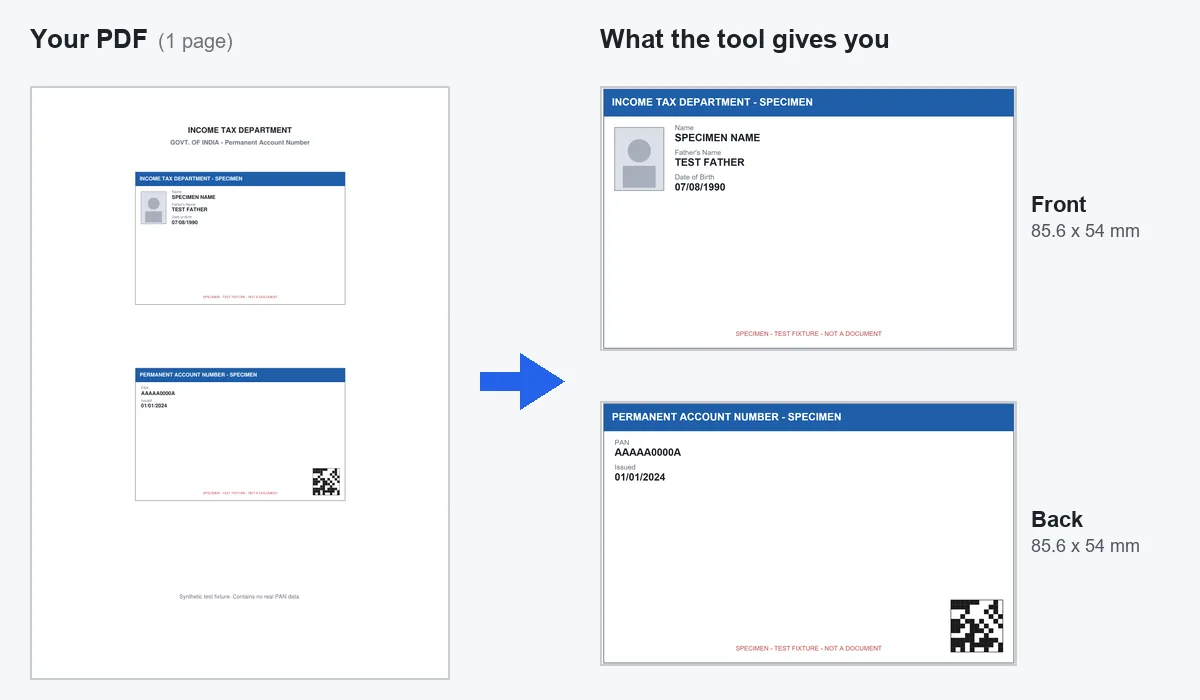
    An e-PAN style PDF with the two card panels stacked on one page; on the right, the front and back cards the tool cut out at 85.6 x 54 mm
    A Protean-style e-PAN, with the two sides stacked on one page. This is a test PDF with made-up details, not a real PAN.

    The password on your e-PAN PDF

    The e-PAN PDF is locked with a password. The password is your date of birth in DDMMYYYY format, with no slashes or dashes.

    Use the date of birth that is on your PAN record. If the PAN belongs to a company or firm, use the date it was formed, in the same format.

    Where to download your e-PAN

    There are three official places: the Protean (formerly NSDL) portal, the UTIITSL portal, and the Income Tax e-Filing portal. Which one works for you depends on which agency made your PAN.

    Downloading is free within 30 days of the PAN being issued or updated. After that, Protean and UTIITSL charge a small fee, about ₹8.26 including taxes, for each download.

    Protean and UTIITSL files look different

    Protean usually puts the front and the back one above the other on one page. UTIITSL sometimes puts the back on a second page. The tool looks at every page, so you do not need to tell it which kind you have.

    If one side is wrong, open Crop not right? Adjust, click Front or Back, and use the page selector if that side is on page 2.

    Printing tip for PAN

    The PAN number and your signature are small. Print at 600 DPI and check them with your eyes after printing. The PVC card print size guide has the pixel sizes, bleed and A4 sheet layout.

    Common questions

    How do I print my PAN card on PVC?
    Choose your e-PAN PDF in the tool on this page, type your date of birth as DDMMYYYY, and download the front and back at 85.6 x 54 mm. Print on a PVC card printer or use the A4 sheet.
    What is the password for the e-PAN PDF?
    Your date of birth in DDMMYYYY format with no separators, for example 07081990. For a company or firm, use the date it was formed.
    Why does my e-PAN have the back on a second page?
    Some UTIITSL e-PANs are laid out that way. The tool checks every page, so it still finds both sides.
    Is e-PAN download free?
    It is free within 30 days of the PAN being issued or updated. After that, Protean and UTIITSL charge about Rs 8.26 including taxes per download.
    Is my PAN PDF uploaded?
    No. The PDF and your date of birth stay in your browser. Nothing is sent to a server.