PVC Card Cropper

Print your Ration Card as a PVC card

Choose your State, then your e-Ration card PDF, in the tool below. You get the front and the back at exact PVC card size, 85.6 × 54 mm. It works with the design of any State or UT.

Free · No sign-up · Nothing uploaded

Crop any PDF to PVC card size

Point it at your e-Aadhaar, PAN, Voter ID or any other document PDF. It finds the card on the page and gives you the front and the back at exactly 85.6 × 54 mm, ready to print.

  • Never uploaded Cropped by your own browser
  • Exact card size 85.6 × 54 mm, CR80
  • Both sides Front and back, print-ready

One PDF in. Front and back out, each at exact card size.

Or pick your document for the right password hint and a better first guess at the crop.

Choose your PDF

One file at a time. Every step repeats for every file, and it pauses after 5 files in 30 minutes.

Crop several PDFs

Choose all the PDFs together. Each one is cropped on this device, exactly as a single file is, and you get one ZIP at the end — 600 DPI PNG, named after each file.

    Free limit reached

    Free cropping pauses after 5 files in 30 minutes.

    The free tool is for your own cards. Making cards for clients? The batch plan below is for you.

    We only count files. Your files never leave your device.

    Batch plan for business

    Make cards for your clients every day? Do them all at once.

    • Up to 25 PDFs at once Drop in all your clients' PDFs. You get one ZIP back.
    • No waiting No pause after 5 files. Finish every client's order.
    • Named for you Each card is named after its PDF, so every client's card is easy to find.
    • Fix one, keep the rest Re-crop any single card without redoing the others.
    • Locked PDFs are fine Each locked file asks for its own password, in its own row.
    • Still nothing uploaded Every file is cropped on your own device, just like now.

    One plan is for one person signed in at a time. Cropping one file at a time stays free.

    No refund once you start a batch run. Refund policy

    Reading your PDF…

    Your card is ready

    Cropped to 85.6 × 54 mm, the standard PVC card size.

    More formats

    For double-sided A4, print both pages on one sheet with “flip on long edge” at 100% scale. Try it on plain paper first.

    Print options

    Drag the boxes onto each side of the card

    Drag to move, pull any handle to resize, and zoom in for a precise edge. Switch to Perspective to drag each corner on its own.

    Front
    Back

    How to print your Ration Card as a PVC card

    1. Download your ration card PDF from your State's food department portal. (How to find it is below.)
    2. In the tool above, first choose which State or UT issued it.
    3. Choose the PDF. In our tests, ration card files opened with no password.
    4. If the front and back are side by side on one A4 page, the tool cuts them apart into two cards. Check both in the preview.
    5. Keep 600 DPI, then download both sides or the A4 print sheet. Print at 100% scale.
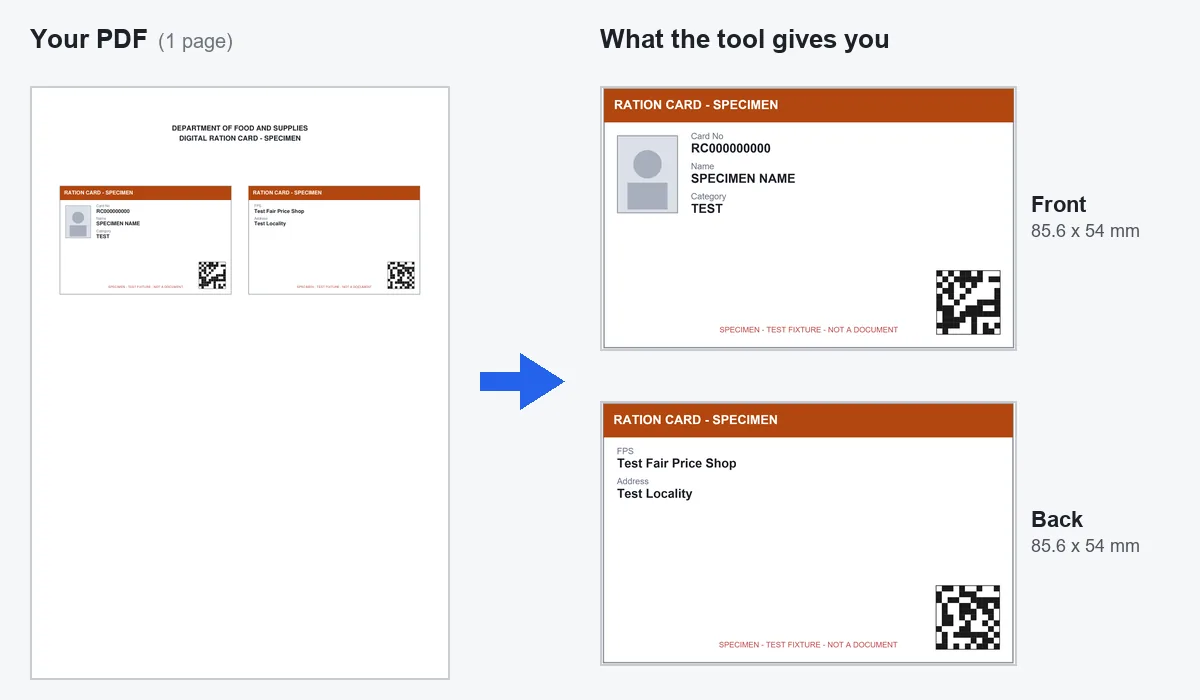
    An A4 ration card PDF with the front and back side by side; on the right, the two sides cut apart into 85.6 x 54 mm cards
    The most common layout in our tests: front and back side by side on one A4 page. This is a test PDF with made-up details, not a real ration card.

    Why the tool asks for your State

    Ration cards are issued by each State and UT under the National Food Security Act, 2013. There is no single design for India. The size, the layout and even the language change from one State to the next.

    The tool does not need a separate template for each State. It finds the card by its shape. Your State choice gives it a starting box if it cannot find the card, and it keeps any crop fix you send for your State only, not for all of India.

    What we tested

    We ran the tool on 71 real ration card PDFs, and it found both sides in all of them. Two layouts came up:

    • A4 page, front and back side by side. The tool cuts them apart into two images.
    • e-Ration card. A different design, where the tool found each side by its shape on the page.

    Other States may use other layouts. If a box lands in the wrong place, open Crop not right? Adjust and move it.

    How to get the PDF

    Each State has its own food department portal. The central NFSA website, nfsa.gov.in, has a page called Ration Card Details on State Portals that links to every State and UT. Open your State from there.

    Not every State offers a PDF you can download. If yours does not, this tool cannot help, because it needs the PDF.

    Printing tip for Ration Card

    Ration cards carry a lot of text in a small space, and some of it is very small. Zoom into the preview before you print, and use 600 DPI. The PVC card print size guide covers every setting.

    Common questions

    How do I print my ration card on PVC?
    Choose your State in the tool on this page, then your ration card PDF. Download the front and back at 85.6 x 54 mm and print them on a PVC card printer, or use the A4 sheet.
    Why does the tool ask for my State?
    Every State and UT designs its own ration card. The tool finds the card by its shape, so it works without a State template. Your State gives it a starting box and keeps any crop fix for your State only.
    My ration card has the front and back on one A4 page. Will it work?
    Yes. That was the most common layout in our tests. The tool cuts the two sides apart into a separate front and back image.
    Where do I download my ration card PDF?
    From your State's food department portal. The nfsa.gov.in page Ration Card Details on State Portals links to every State and UT. Not every State offers a downloadable PDF.
    Does the ration card PDF have a password?
    None of the ration card PDFs we tested had one. The tool checks your file and only asks for a password if it is locked.