PVC Card Cropper

Print your Voter ID (e-EPIC) as a PVC card

Choose the e-EPIC PDF you downloaded from the Election Commission portal in the tool below. You get the front and the back at exact PVC card size, 85.6 × 54 mm, ready to print.

Free · No sign-up · Nothing uploaded

Crop any PDF to PVC card size

Point it at your e-Aadhaar, PAN, Voter ID or any other document PDF. It finds the card on the page and gives you the front and the back at exactly 85.6 × 54 mm, ready to print.

  • Never uploaded Cropped by your own browser
  • Exact card size 85.6 × 54 mm, CR80
  • Both sides Front and back, print-ready

One PDF in. Front and back out, each at exact card size.

Or pick your document for the right password hint and a better first guess at the crop.

Choose your PDF

One file at a time. Every step repeats for every file, and it pauses after 5 files in 30 minutes.

Crop several PDFs

Choose all the PDFs together. Each one is cropped on this device, exactly as a single file is, and you get one ZIP at the end — 600 DPI PNG, named after each file.

    Free limit reached

    Free cropping pauses after 5 files in 30 minutes.

    The free tool is for your own cards. Making cards for clients? The batch plan below is for you.

    We only count files. Your files never leave your device.

    Batch plan for business

    Make cards for your clients every day? Do them all at once.

    • Up to 25 PDFs at once Drop in all your clients' PDFs. You get one ZIP back.
    • No waiting No pause after 5 files. Finish every client's order.
    • Named for you Each card is named after its PDF, so every client's card is easy to find.
    • Fix one, keep the rest Re-crop any single card without redoing the others.
    • Locked PDFs are fine Each locked file asks for its own password, in its own row.
    • Still nothing uploaded Every file is cropped on your own device, just like now.

    One plan is for one person signed in at a time. Cropping one file at a time stays free.

    No refund once you start a batch run. Refund policy

    Reading your PDF…

    Your card is ready

    Cropped to 85.6 × 54 mm, the standard PVC card size.

    More formats

    For double-sided A4, print both pages on one sheet with “flip on long edge” at 100% scale. Try it on plain paper first.

    Print options

    Drag the boxes onto each side of the card

    Drag to move, pull any handle to resize, and zoom in for a precise edge. Switch to Perspective to drag each corner on its own.

    Front
    Back

    How to print your Voter ID as a PVC card

    1. Download your e-EPIC PDF from the ECI voter services portal. You sign in and confirm with an OTP.
    2. Choose the PDF in the tool above. Most e-EPIC files open straight away with no password.
    3. The tool finds the front and the back, whether they are on one page or two, and shows both.
    4. Keep 600 DPI. Add bleed only for an edge-to-edge card printer.
    5. Download both sides, or the A4 print sheet. Print at 100% scale.
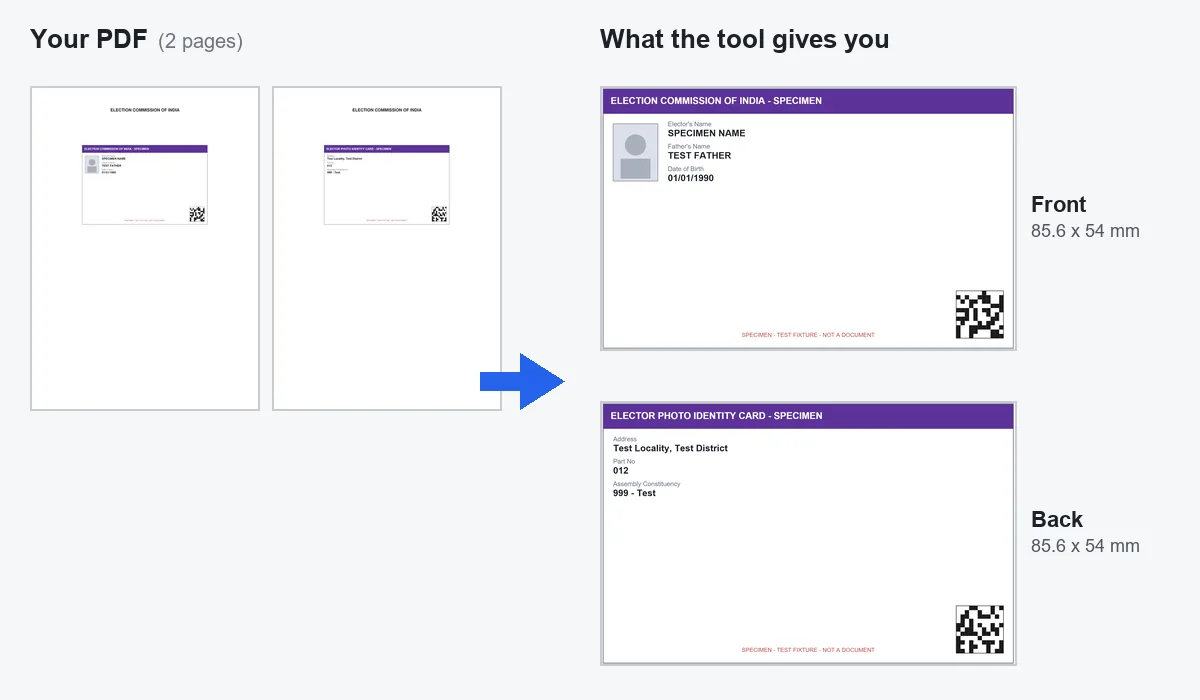
    A two-page e-EPIC style PDF with one side of the card on each page; on the right, the front and back cards the tool made at 85.6 x 54 mm
    An e-EPIC style PDF with one side on each page. This is a test PDF with made-up details, not a real voter ID.

    About the e-EPIC

    The e-EPIC is the digital version of the Elector Photo Identity Card, issued by the Election Commission of India. The ECI calls it a self-printable digital voter ID. So printing it is the intended use, not a trick.

    Passwords

    The e-EPIC PDF usually opens with no password. Some downloads are locked. Then the password is generally your EPIC number. The tool only asks if your file is really locked, so just try opening it first.

    Why the e-EPIC is easy to crop

    The e-EPIC is already drawn at nearly card shape. That makes it one of the easiest documents for the tool to find. If a side still looks wrong, open Crop not right? Adjust, pick Front or Back, and drag the box onto the card.

    Printing tip for Voter ID

    Your photo is the largest picture on the card. On a home inkjet, 300 DPI is enough; on a card printer use 600. The PVC card print size guide explains the settings in full.

    Common questions

    How do I print my voter ID card on PVC?
    Choose your e-EPIC PDF in the tool on this page and download the front and back at 85.6 x 54 mm. Print them on a PVC card printer, or print the A4 sheet on a PVC sheet and cut.
    Does the e-EPIC PDF have a password?
    Usually not. Some downloads are protected and generally use the EPIC number. The tool checks whether your file is locked and only asks if it is.
    Can I print my e-EPIC and use it?
    The Election Commission issues the e-EPIC as a self-printable digital voter identity card. A card you print is still a printed copy rather than an officially issued card, and acceptance is up to the organisation asking for it.
    Is my voter ID PDF uploaded?
    No. The tool reads and crops the file inside your browser only.