The size of a PVC card
A PVC ID card is 85.6 × 54 mm. The exact size is 85.60 × 53.98 mm, which most people round to 54. This is the ID-1 size from the ISO/IEC 7810 standard. Printers and card shops call it CR80. It is the same size as a debit card.
Every card this tool makes is exactly this size. You do not need to resize anything after you download it.
Which DPI to choose
DPI means dots per inch. More dots means a sharper card, but a bigger file. The tool has three choices. These are the exact pixel sizes it gives you:
| Setting | Card size in pixels | Use it for |
|---|---|---|
| 300 DPI | 1011 × 638 | Inkjet or home printers |
| 600 DPI | 2022 × 1275 | Card printers. This is the default. |
| 1200 DPI | 4044 × 2550 | The sharpest file, if your printer can use it |
600 DPI is the safe choice. At that size the small print stays readable and the QR code prints sharp enough to scan. The tool draws the card from the PDF itself, not from a screenshot, so a higher DPI really gives more detail.
Bleed: when to switch it on
Bleed adds 1 mm of extra picture on every side, so the file becomes 87.6 × 56 mm. Use it only with a card printer that prints edge to edge. These printers print a little bigger than the card and cut the extra away. Without bleed, you can get a thin white line at the edge.
If the card design already runs to the edge of the page, there is no extra picture to use. The tool then repeats the edge colour outward, so you do not get a pale border.
If you will cut the card by hand, leave bleed off.
PNG or JPG
- PNG keeps every pixel exactly. Choose it for printing.
- JPG makes a smaller file. Choose it if you need to send the card by WhatsApp or email.
PDF: the safest file to print
A PDF carries real millimetres, so it prints at the exact size with no DPI setting to get wrong. Under More formats the tool gives you two:
- PDF (card size): two pages, each exactly 85.6 × 54 mm, the front and then the back. For card printers.
- Double-sided A4 (PDF): page 1 has 8 fronts, page 2 has 8 backs. Print both pages on one sheet, with “flip on long edge”, and every back lands behind its own front. Try it on plain paper first; printers differ.
The Print button opens your print window with the page size already set to the card.
Printing on an A4 PVC sheet
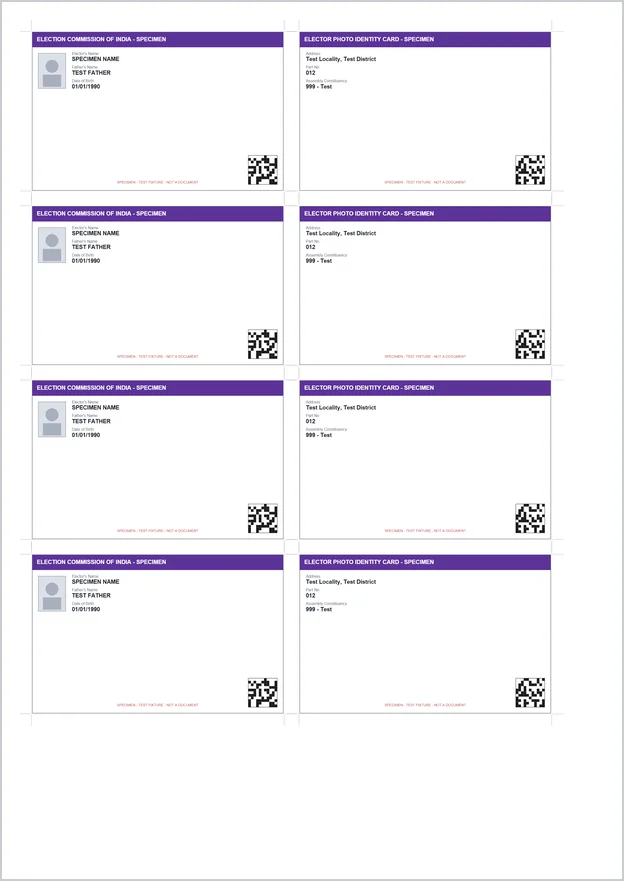
If you print on A4 PVC or Teslin sheets and cut the cards out, use Double-sided A4 (PDF) above, or A4 sheet (image). The image sheet places 8 cards on one A4 page: 4 rows, each with the front on the left and the back on the right. The sheet is made at 300 DPI.
- 10 mm margin around the page, so the printer does not cut anything off.
- 5 mm gap between cards, so you have room to cut.
- Small cut marks at every corner, outside the card, so you can see where to cut.
Print at 100%, not "Fit to page"
This is the most common reason a card comes out the wrong size. In the print window, choose Actual size or 100% scale. If the printer uses "Fit to page", it shrinks or grows the page, and the cards will not be 85.6 mm wide any more.
After printing, measure one card with a ruler. It should be 85.6 mm wide and 54 mm tall.
Guides for each document
Each document has its own PDF layout and its own password rule. See the guide for yours: Aadhaar, PAN, Voter ID, Driving Licence, Vehicle RC, Ayushman, Ration Card, ABHA, e-Shram, ESIC and UDID.